The most common message I get is a TikTok link and three words: "where is this?" The comments never say, the caption is a song lyric, and the person who posted it hasn't answered location questions since 2024.
Here's the workflow I actually use. One expectation to set first: if the video came from TikTok, YouTube, Instagram, or WhatsApp, its GPS metadata is already gone — platforms strip it on upload. That's fine. The reliable method never depended on metadata anyway. It depends on frames.
First, Give Metadata 60 Seconds (Just in Case)
If — and only if — you have the original file (straight off a phone, AirDropped, or emailed as an attachment), check it before doing any detective work. Phone videos can carry GPS in the container: run exiftool -gps:all video.mp4, or use any metadata inspector that reads MP4/MOV.
Coordinates there? You're done in one minute. Downloaded the video from a platform? Skip this step entirely — re-encoding strips it, the same way platforms strip photo EXIF. Don't spend twenty minutes hoping; the pixels are the plan.
The Method That Works: Frames, Not Files
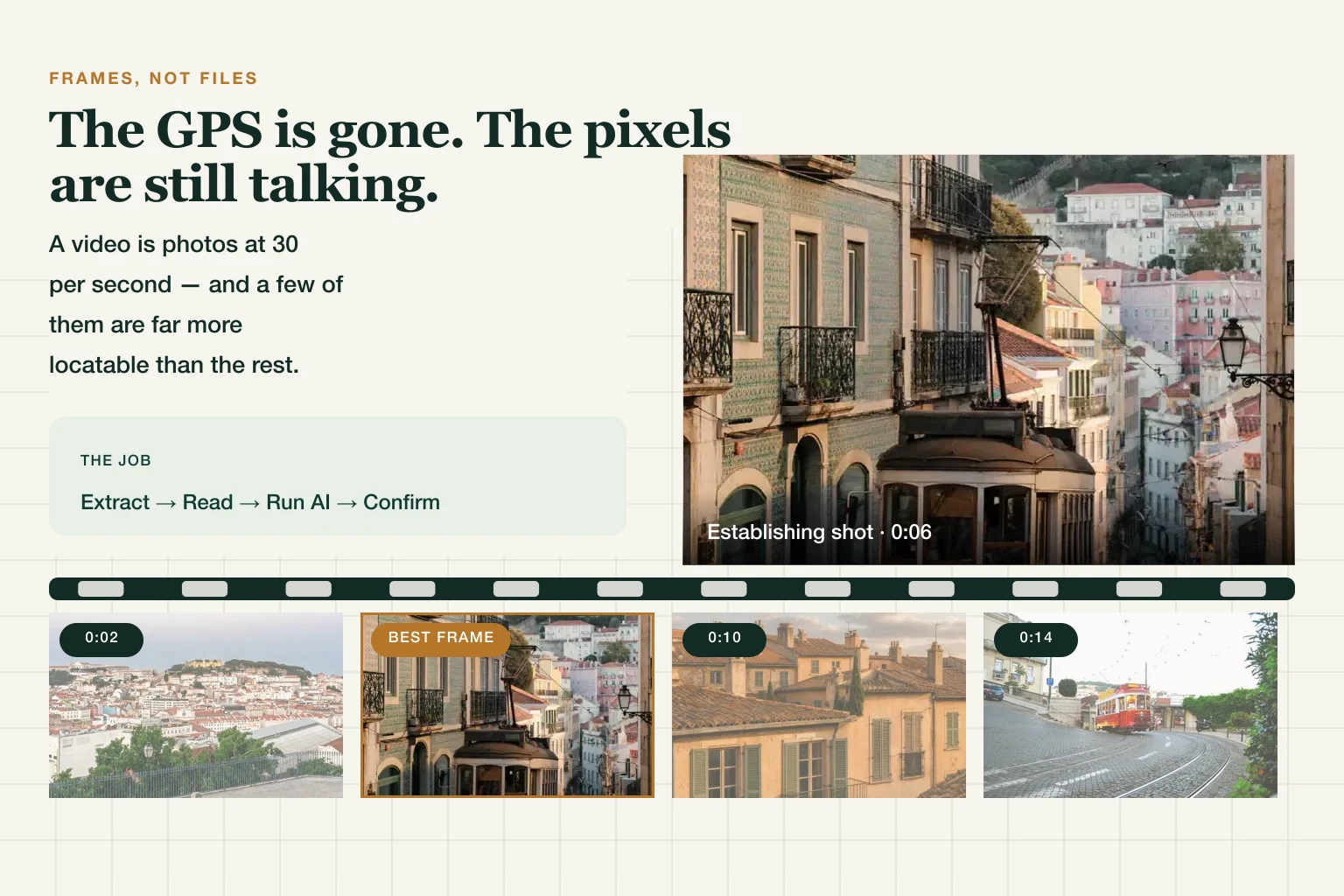
A video is just photos at 30 per second — and some of those photos are far more locatable than others. The whole job:
- Extract the 3–5 most information-dense frames.
- Read them for geographic clues (including with your ears).
- Run the best frames through AI geolocation.
- Confirm the candidate in Street View.

Step 1 — Extract the Right Frames
Not random screenshots. You're hunting for:
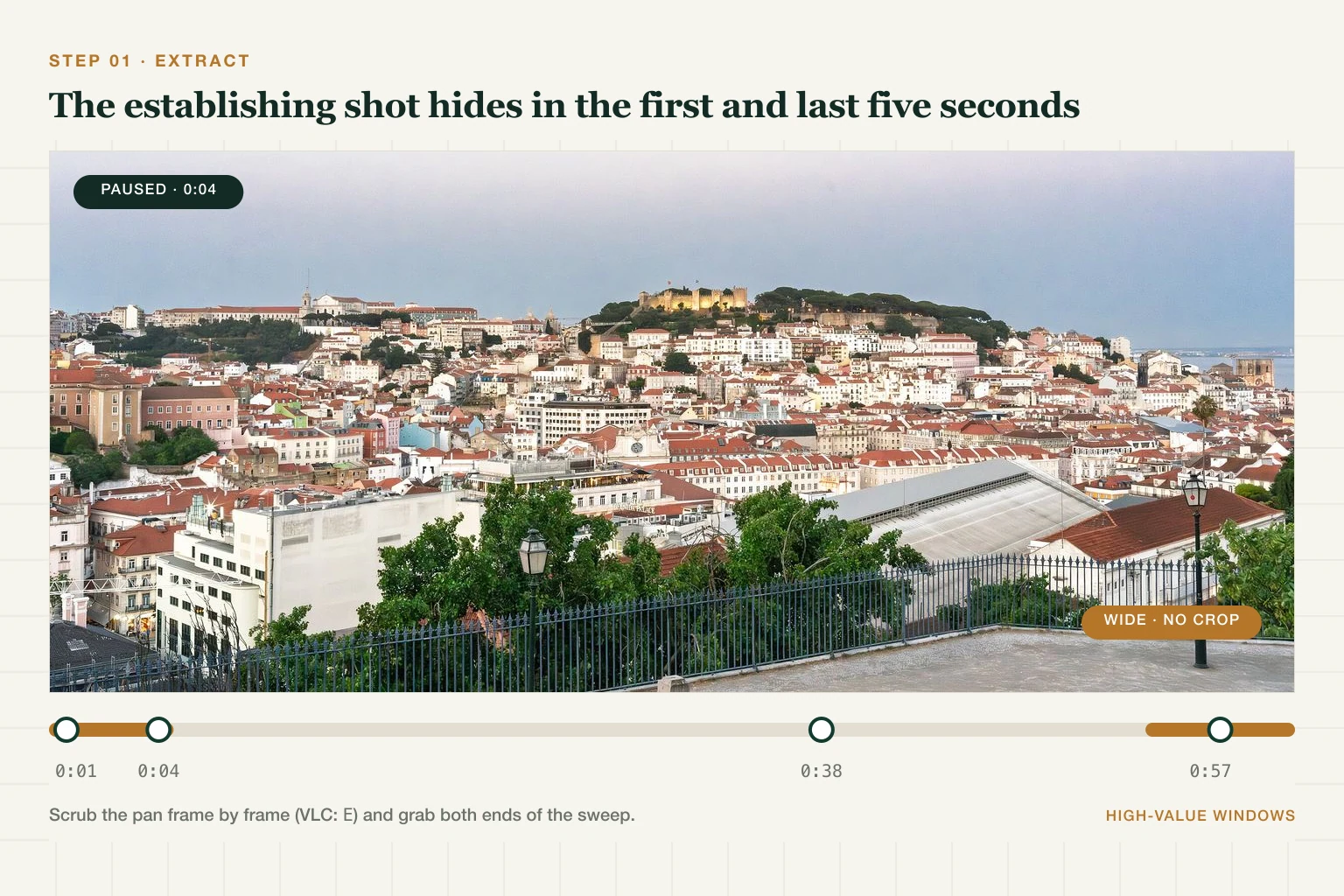
- The establishing shot. Creators almost always open or close with a wide scene-setting shot — check the first and last five seconds before anything else.
- Pan sweeps. A camera pan is a free panorama. Step through it frame by frame (VLC:
Ekey; most phone players: pause and scrub slowly) and grab both ends of the sweep. - Text frames. Any moment a sign, storefront, plate, or bus route number is readable — pause and capture it, even if it's a background blur elsewhere.
Getting Clean Frames From Each Platform
Frame quality drops in a predictable order — downloaded file > in-app screenshot > screen recording — and every step down costs you readable text first, which is exactly the clue you most need. Platform by platform:
- TikTok — the in-app download stamps a moving watermark. It drifts around the frame, so if it's sitting on a sign, scrub a few frames forward and it will have moved off.
- YouTube — set quality to the highest available before pausing. The player often starts a lower rendition, and a paused 480p frame throws away the signage you're hunting for. Full-screen, then pause.
- Instagram — no native download, so screen-record and crop the UI chrome out. Record in the highest screen resolution your device offers.
- WhatsApp — forwarded video is re-compressed at each hop. Ask the sender for the original file rather than working from a chain; it's usually the difference between a legible shopfront and a smear.
Step 2 — Read the Frames Like a Geolocator
Work each frame with the same clue stack GeoGuessr players use:
| Clue type | What to look for |
|---|---|
| Text & script | Shop signs, street names, phone number formats — script alone narrows the region |
| Roads & vehicles | Driving side, road line colors, plate shapes, taxi liveries |
| Buildings & vegetation | Roof styles, balcony patterns, palm vs pine vs eucalyptus |
| Infrastructure | Power pole shapes, bus stops, traffic light orientation |
Don't Skip the Audio
The clue everyone ignores because they're staring at pixels: sound. A language or accent bounds the region instantly. Sirens differ by country (two-tone Europe vs wail US). Transit announcements name actual stations. A TV in the background might be running local news. Thirty seconds with your eyes closed is a genuinely productive geolocation technique — and no, none of the tools do this part for you.
Step 3 — Run Your Best Frames Through AI
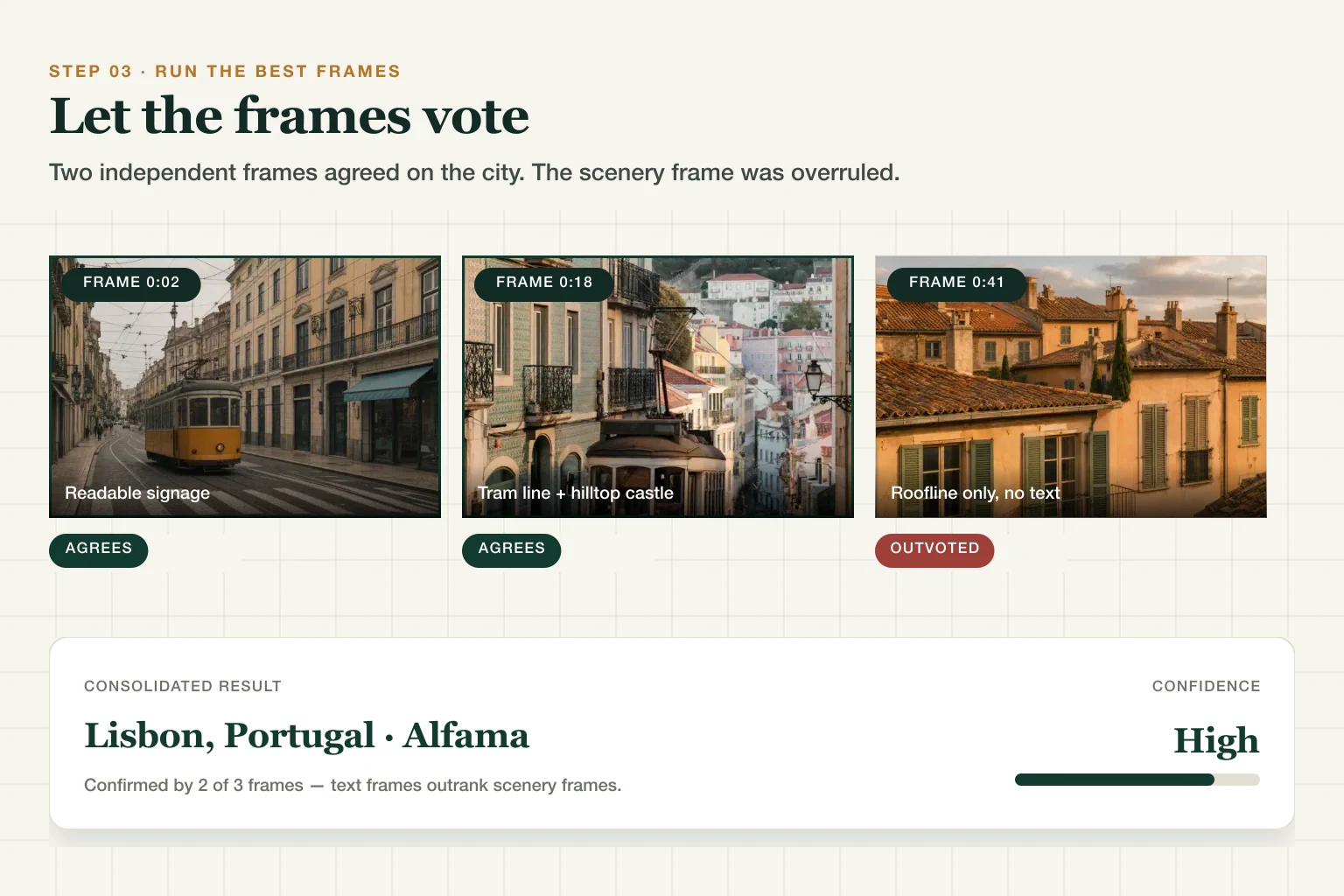
Take your three strongest frames and run them through our AI location finder — it reads the same clue categories and returns candidate locations with confidence levels. Then apply the voting rule:
- All three frames agree → strong candidate, go confirm it.
- Frames disagree → trust the frame with readable text over scenery frames, and re-run with a tighter crop of the text.
- All three shrug → your frames are the problem, not the method. Back to Step 1 for better ones.
If the video is specifically a TikTok and you want the platform-tuned flow, the TikTok location finder wraps the same engine with TikTok-specific guidance.
Step 4 — Confirm With Street View Geometry
An AI candidate is a hypothesis, not an answer. Open the spot in Street View and match geometry, not vibes: the curve of the road, the angle between two buildings, the skyline behind the roofs. Three independent features lining up = confirmed. Anything less = keep looking. (The full geometry-matching method is the same one we use to align old photos with Street View.)
Walk Through It Once: A Tram, Four Frames
Here's the whole loop on a concrete example, so you can run the same shape on your own clip. Say you have a sixty-second travel video: a tram, some narrow streets, a rooftop panorama, no caption worth reading.
Frames you'd pull. The wide rooftop shot at 0:04 (establishing, from the first five seconds). The tram at 0:02, because a tram carries a route number and a destination board. A balcony-level street shot at 0:18. A close roofline at 0:41, which looks scenic and turns out to be near-worthless.
What each frame gives up. The tram frame is the decisive one — a destination board is written language, and wording separates Portuguese from Spanish immediately. Add right-hand traffic and cobbled paving and you have three independent clues agreeing. The rooftop panorama contributes a hilltop castle silhouette and terracotta roofing. The roofline close-up contributes almost nothing: terracotta tiles and painted shutters span the entire Mediterranean.
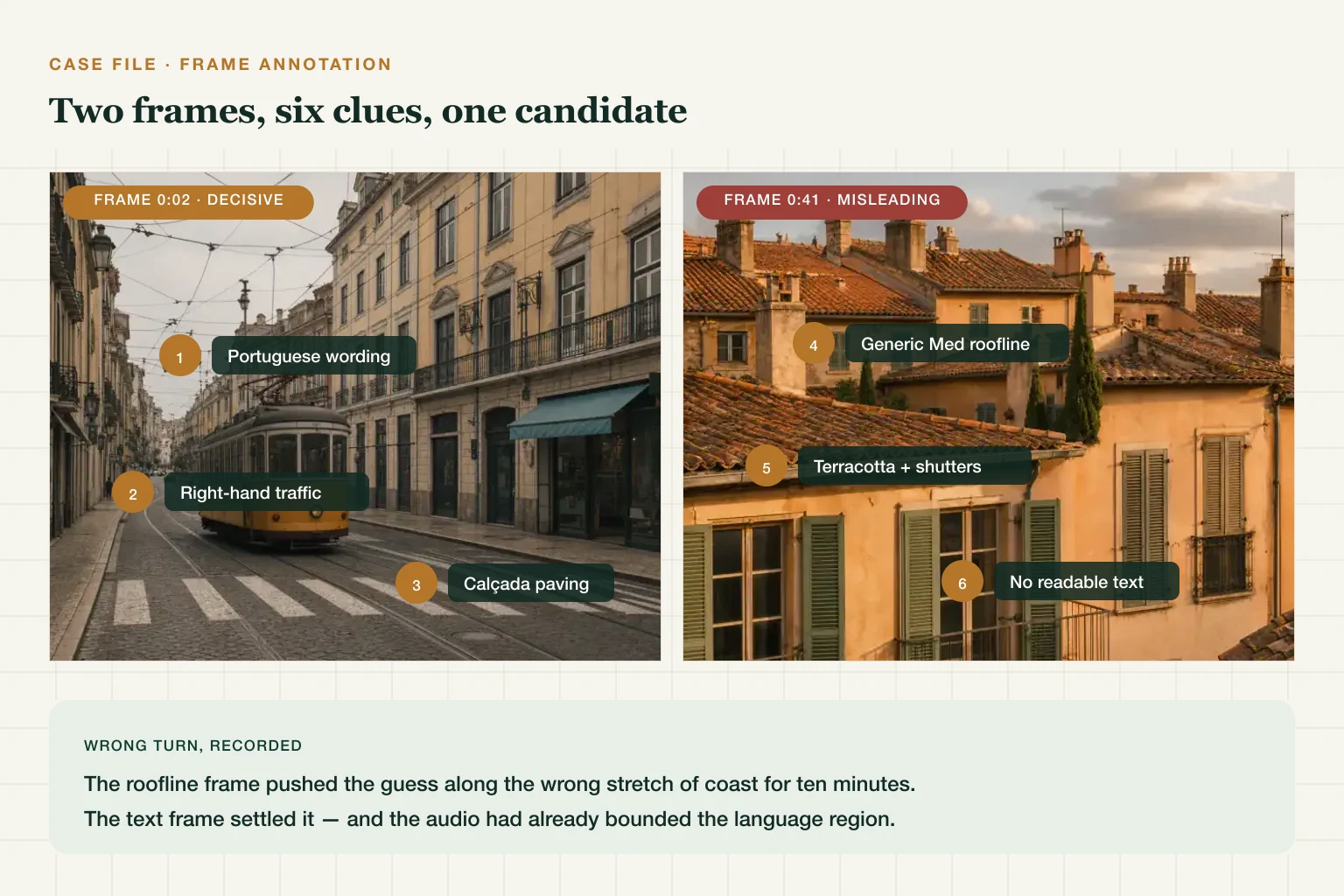
Where this typically goes wrong. The scenic frame is the trap. It's the prettiest, so it's the one people run first — and a generic Mediterranean roofline invites a confident answer anywhere along a two-thousand-kilometre arc of coast. Meanwhile the audio may already have settled the language region before you looked at a single pixel.
Confirming it. With a candidate street in hand, open Street View and match geometry: the specific curve of the tram rails, the angle where one façade meets the next, the roofline behind. Three features aligning is the bar.
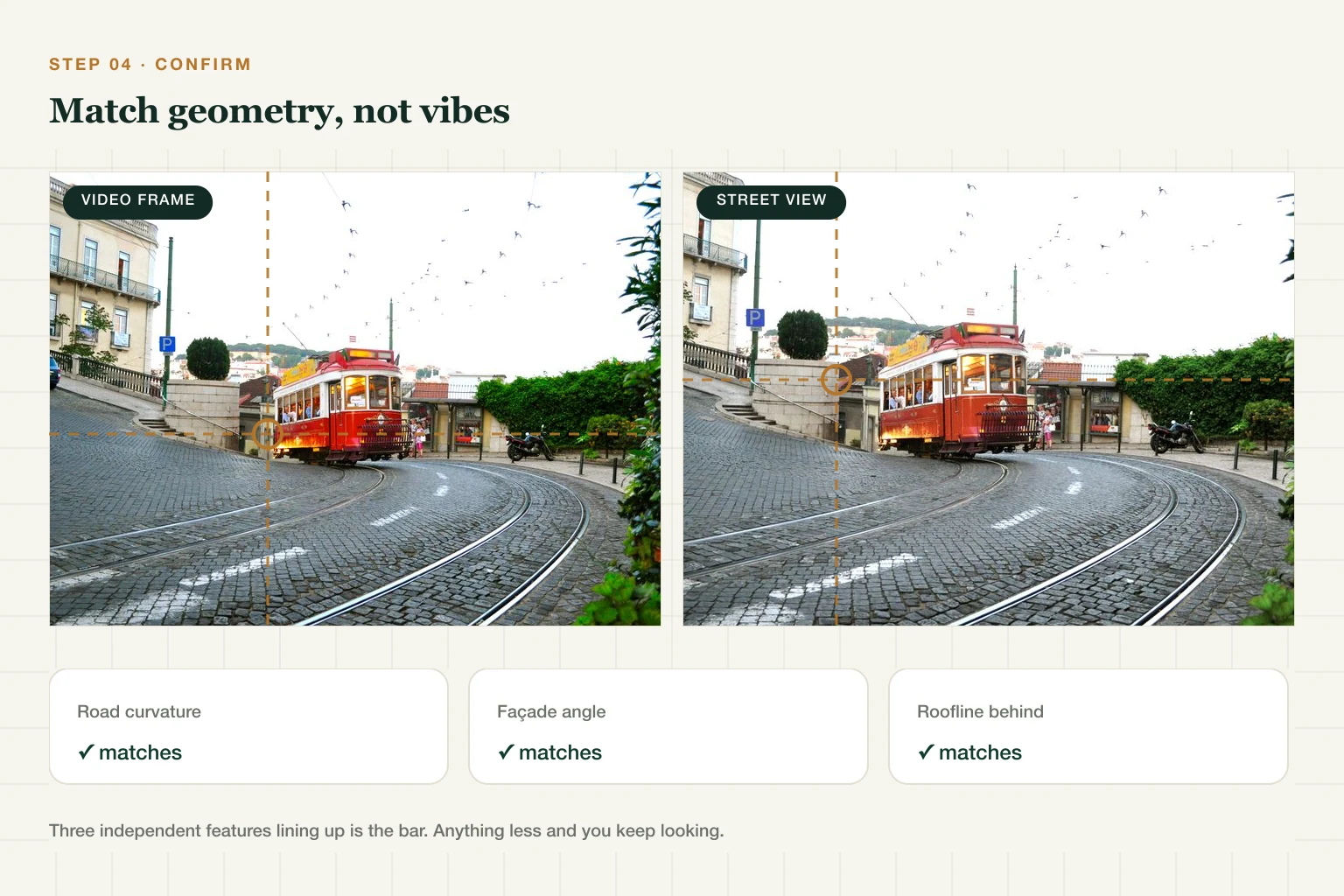
The general lesson, and it holds well beyond this example: text frames outrank scenery frames, and the frame you find most beautiful is rarely the frame that locates the video. For fully worked examples with published ground truth, see our case files.
Platform Cheat Sheet: TikTok, YouTube, Instagram, WhatsApp
| Platform | Metadata after upload | Best way to get frames | Platform-specific clues |
|---|---|---|---|
| TikTok | Re-encoded on upload; assume no GPS | Download, then dodge the moving watermark | Location tags, local sounds, caption language — dedicated flow here |
| YouTube | Re-encoded on upload; assume no GPS | Max quality first, then pause | Description, chapters, auto-captions naming places |
| Re-encoded on upload; assume no GPS | Screen-record, crop the UI | Location stickers, tagged spots | |
| Re-encoded per forward; assume no GPS | Ask the sender for the original file | Forward chains degrade quality — get upstream |
Two honest caveats on that first column. The major platforms are documented as stripping EXIF from photos on upload, and they re-encode video the same way — but video container metadata is a separate mechanism from photo EXIF, and no platform commits to it in writing. Second, platform behaviour changes without announcement. So treat "assume no GPS" as the safe working assumption, not a guarantee in either direction: check the file yourself when it matters, and never rely on stripping as a privacy measure for something you can't afford to leak.
When the Video Won't Crack
Some videos genuinely lack enough signal. Before giving up: post your best frames to r/whereisthis with what you've ruled out (a specific ask gets answers; "where is this?" alone gets ignored). If when matters as much as where, shadows, clothing, and vegetation season can bound the date — a topic of its own.
If You're the One Posting Videos
Everything above works on your videos too. Before posting from home: skip the establishing shot of your street, and strip the original file's metadata if you're sharing it directly — same habit as photos, same tool.
Frequently Asked Questions
Can you find the location of a video? Usually, yes — if the video shows outdoor scenes with signs, roads, or skylines. Extract the best frames, read the clues, run AI geolocation, and confirm in Street View.
Do TikTok videos have location data? Assume not. TikTok re-encodes on upload, so a downloaded clip should be treated as carrying no usable GPS. Location comes from what's visible and audible in the video, plus any location tag the creator added.
How do I find where a YouTube video was filmed? Check the description and captions for place names first, then pause on the clearest wide shots and run those frames through AI geolocation.
Can AI find a location from a video? AI works on frames, not the video file — extract 3–5 information-dense frames and let the frames vote. Agreement across frames is the reliability signal.
What if the video has no visual clues at all? Listen — language, sirens, announcements. If audio fails too, post frames to a geolocation community with your ruled-out list, or accept that some clips can't be placed.
Got a video open in another tab right now? Grab its three best frames and see where they point.