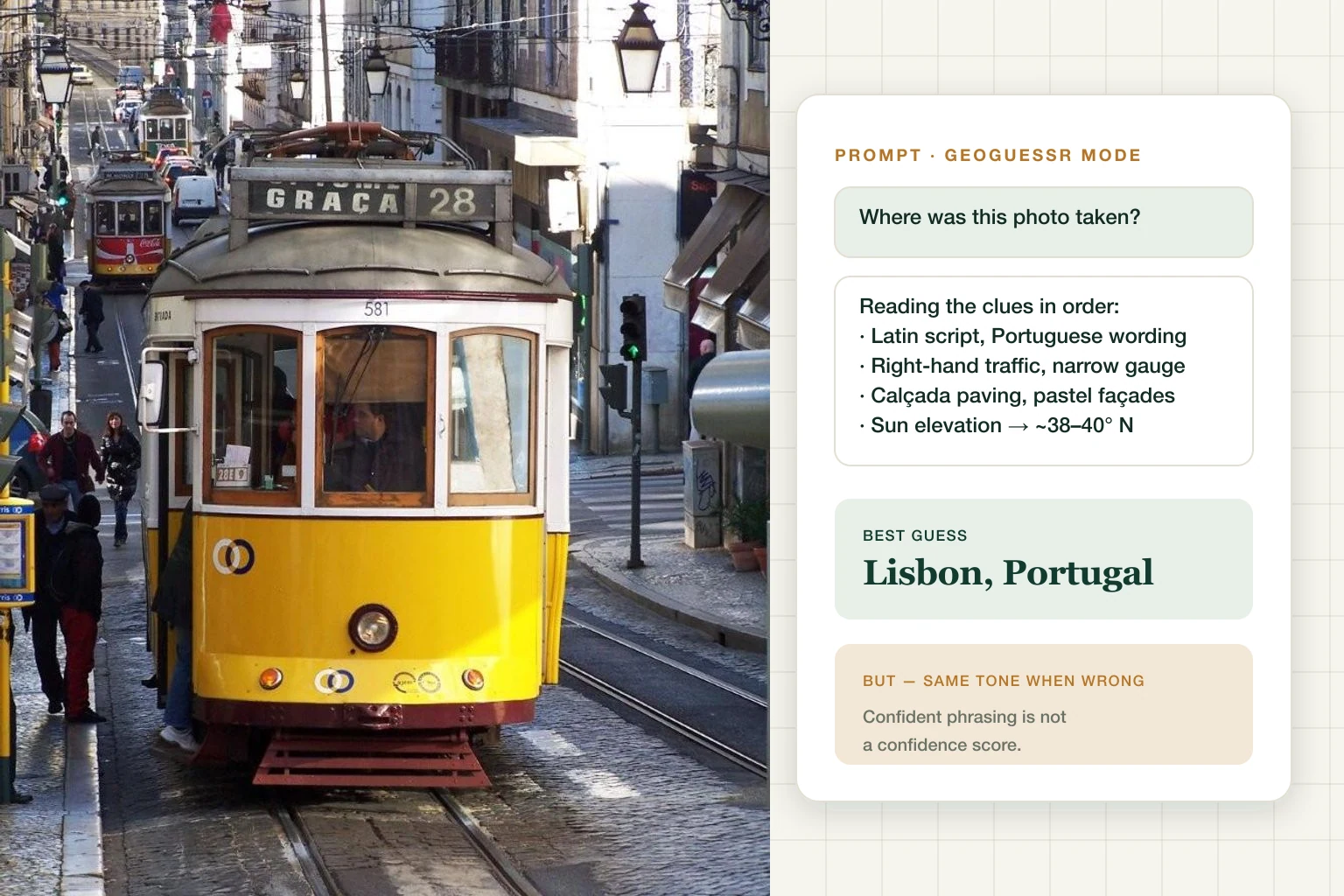
Yes — ChatGPT can often guess where a photo was taken, sometimes down to the city block. It can also deliver a completely wrong answer in exactly the same confident tone, and you won't know which one you got. Both halves of that sentence matter.
When OpenAI's reasoning models made "reverse location search" go viral in April 2025, the coverage was all one-off party tricks — someone posts a lucky hit, everyone gasps, nobody mentions the misses. That framing is useless if you actually need an answer, because it tells you nothing about when to trust it.
What predicts success isn't the model. It's the photo.
What Decides Whether ChatGPT Gets It Right
The single most useful thing to understand: accuracy is not one number, it's a distribution, and scene type dominates everything else. The same model that pins a street corner in Lisbon will confidently place a café two continents away.
Here's the honest breakdown by what you're holding — assuming a screenshot with no EXIF, so the model is working from pixels alone:
| What you're holding | Realistic ceiling | Why |
|---|---|---|
| Famous landmark | Near-certain, often exact | Landmark recognition is a solved problem |
| Ordinary city street | City level, sometimes the block | Needs readable text and built-environment clues |
| Rural road | Country or region at best | Vegetation bounds climate, not borders |
| Indoor shot | Usually fails outright | No geography in frame to read |
| Night photo | Usually fails outright | The clues exist but aren't visible |
| Tight crop of a person or object | Usually fails outright | Nothing left to reason from |
| Decades-old photo | Country, rarely better | The referenced streetscape may not exist now |
Two photos of the "same" difficulty can land very differently, so treat this as a prior, not a promise. The rest of this article is about reading which row you're in before you trust an answer.
How ChatGPT Guesses a Location (When It Works)
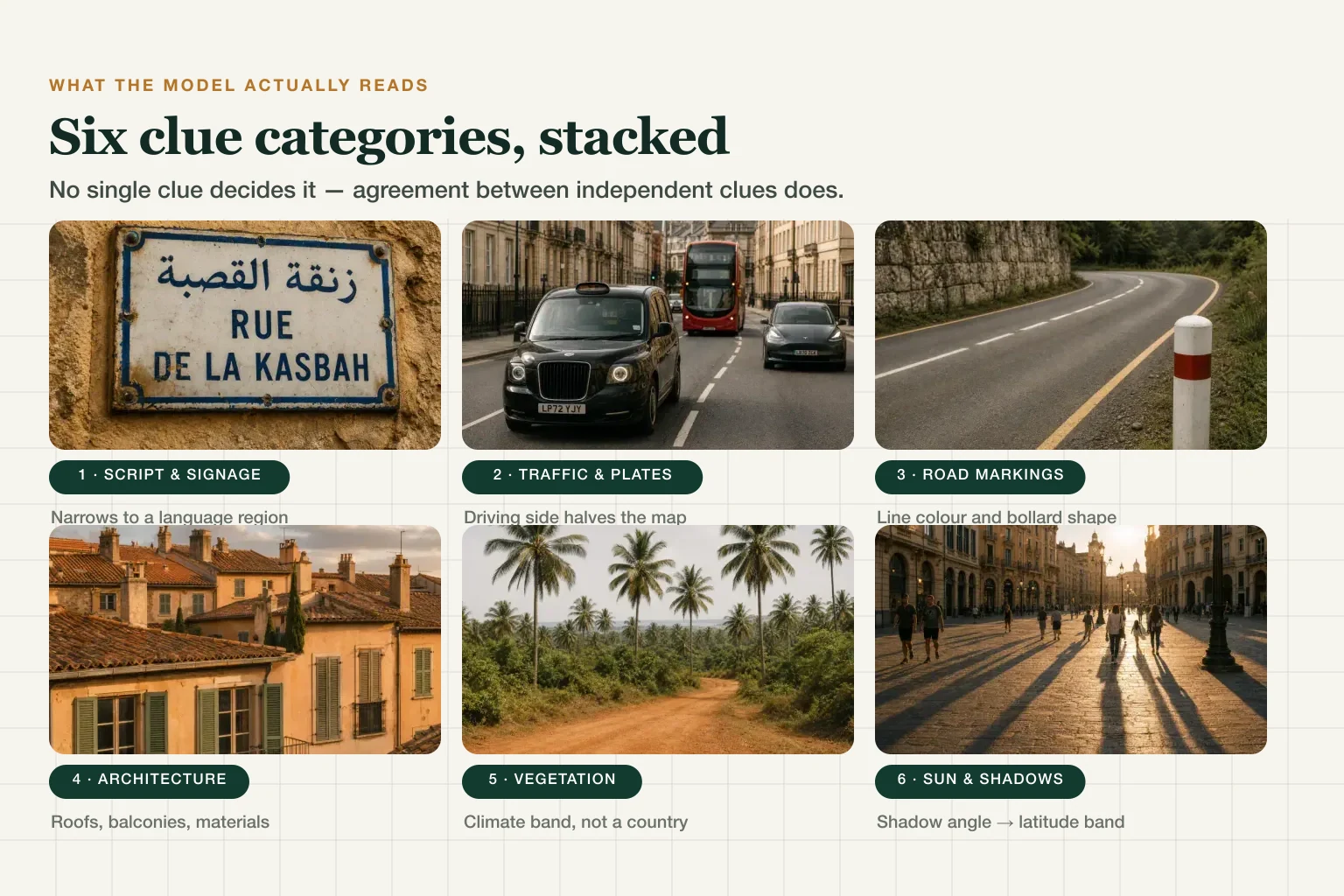
Give ChatGPT a photo and it works the scene like a methodical GeoGuessr player: crops and zooms into corners, reads signage and script, classifies architecture and vegetation, then — when it has web access — cross-checks candidate places. The clue categories are the same ones pro players read: driving side, road lines, poles, plants, shopfronts.
The Latitude Trick
The part that surprises people: reasoning models can estimate latitude from shadows. Sun elevation at a given time of day pins a latitude band within a few degrees, which quietly eliminates half the planet before any sign is read — independent researchers have documented o3 doing exactly this. It's not magic; it's astronomy plus patience.
When It Works, This Is What It Looks Like
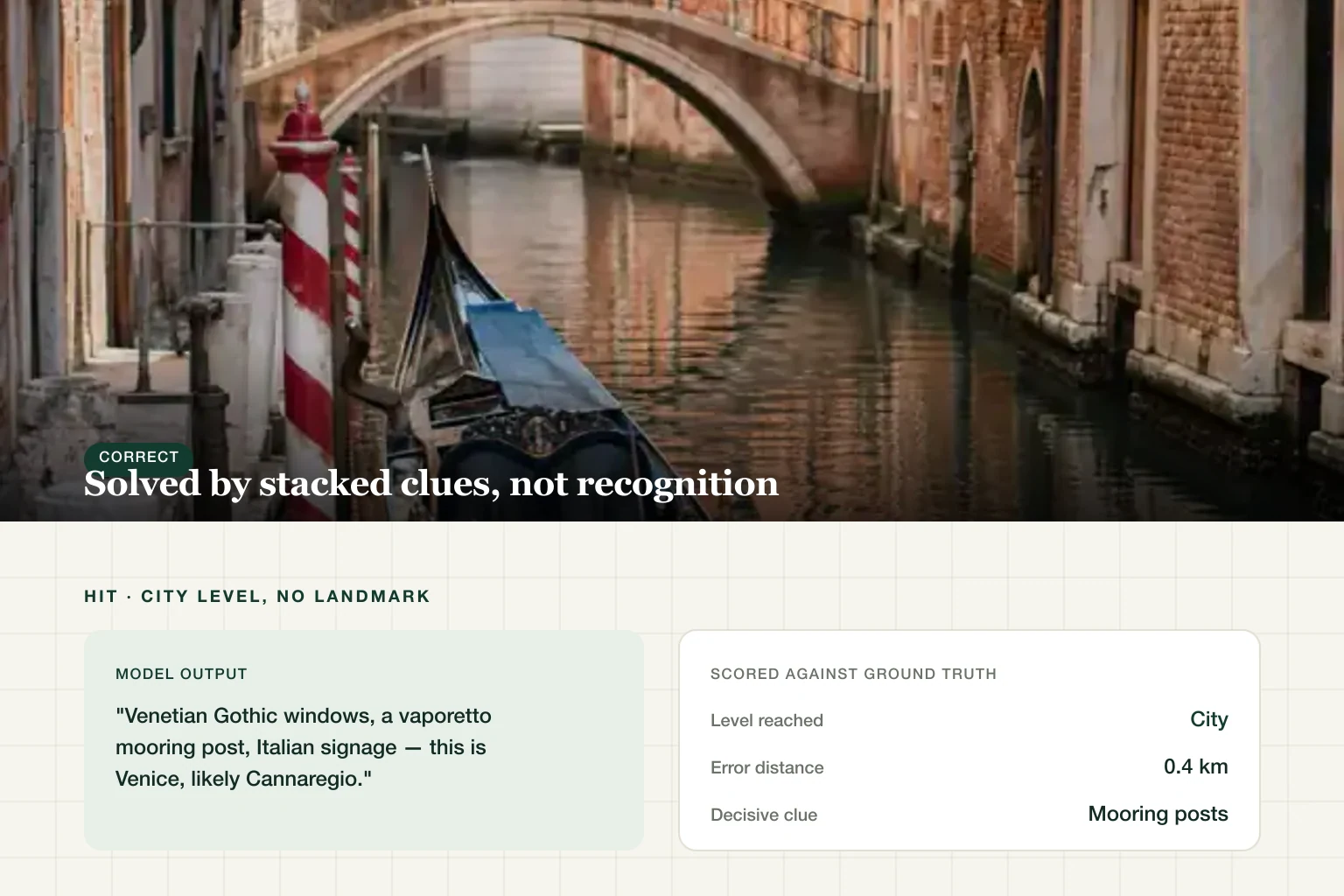
The impressive mode isn't landmark recognition — that's just a lookup. It's a photo with no landmark at all, solved by evidence stacking, and it follows a recognisable shape:
- Script narrows the region. Latin, Cyrillic, Arabic, Han, Thai — each cuts the map hard before anything else is read.
- Wording narrows the language. "Rua" vs "Calle" vs "Carrer" separates Portugal, Spain, and Catalonia on a single shop sign.
- The built environment confirms or kills it. Paving pattern, balcony ironwork, roof pitch, tram gauge — each either agrees with the language hypothesis or contradicts it.
- Traffic direction and plate shape halve what's left.
The reason it lands isn't any single clue. It's four independent clues agreeing — which is also why the failures below are so predictable.
Where It Confidently Fails
The Four Photo Types That Break It
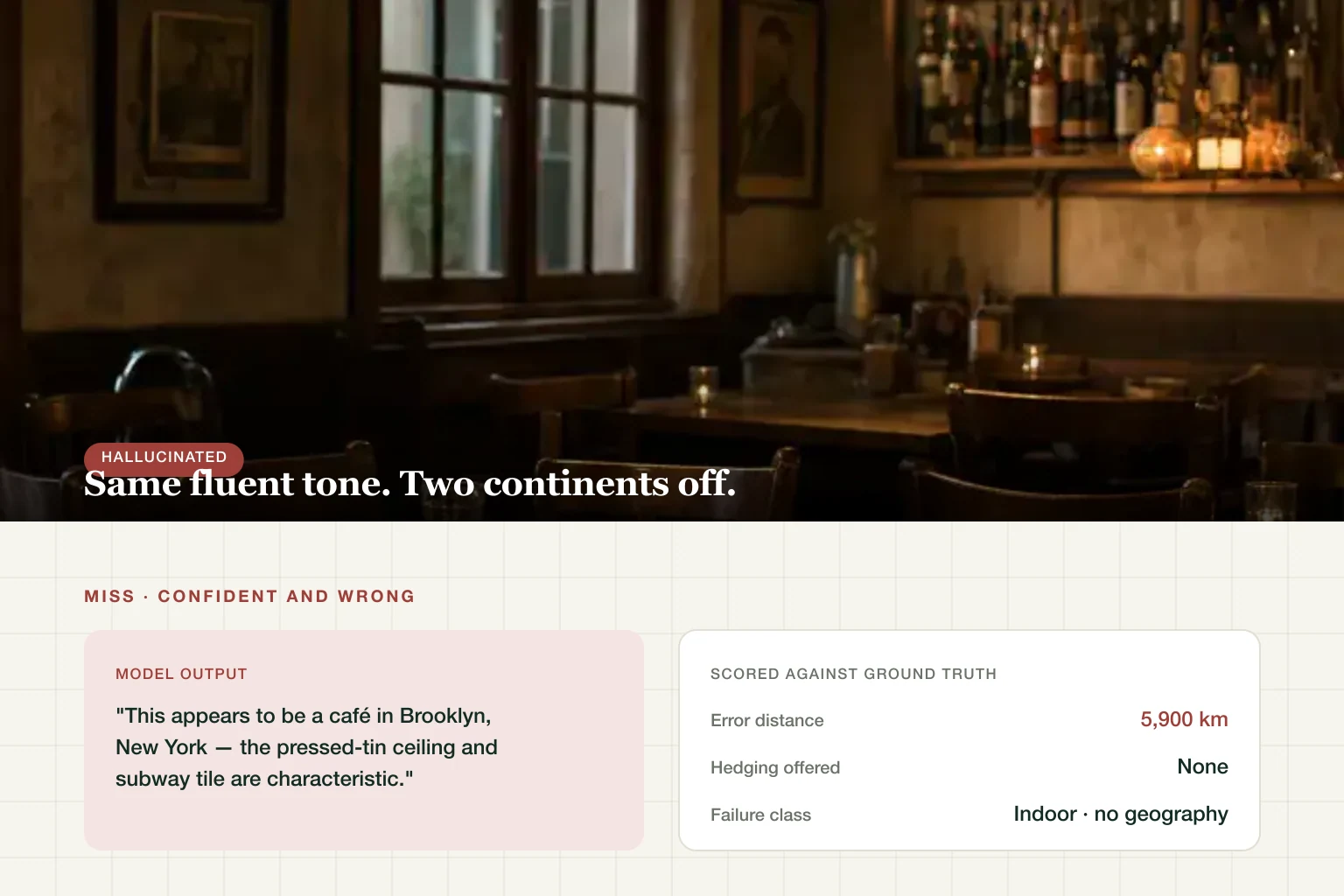
Four categories account for most failures: indoor shots (no geography to read), night photos (clues present but invisible), tight crops of people or objects, and text-free rural scenes (a eucalyptus tree grows on five continents).
The failure mode is the dangerous part, and it's structural rather than occasional. The model does not say "I can't tell." It says "This appears to be a café in Brooklyn — the pressed-tin ceiling and subway tile are characteristic," in exactly the fluent, specific register it uses when it's right. Pressed tin and subway tile are on four continents; the sentence is confident and the reasoning is decorative.
Confident tone is not confidence data. That's the single most important thing to internalise here. A tool that returns a calibrated confidence score can tell you it's unsure; a chatbot that never hedges cannot. The absence of hedging carries no information either way.
The GeoGuessr Prompt That Makes It Try Harder
The viral prompt, cleaned up and tested:
Play GeoGuessr with this photo. Before naming any place:
1. List every visual clue by category (script/signage, road
   markings, vehicles, vegetation, architecture, terrain, light).
2. Give your top 3 candidate locations, ranked with reasoning.
3. State what evidence would confirm or kill each candidate.
Then give your best single guess with an uncertainty estimate.
Forcing clues-before-conclusion is the whole trick: a model that has to enumerate evidence first has fewer places to hide a guess. It reduces the confident-wrong mode; it does not remove it. One caution: whatever you upload is processed by the model provider — don't feed it photos that reveal more about you than you intend.
ChatGPT vs a Dedicated Geolocation Tool
The interesting differences aren't about which one is "smarter" — they're about what each one hands you:
| Dimension | ChatGPT | Dedicated tool |
|---|---|---|
| Casual one-off guess | Great — you already have it | Works, but that's not the gap |
| Reasoning you can read | Excellent, step-by-step prose | Structured clue report |
| Coordinates + map pin | Sometimes, loosely | Always, with a radius |
| Telling you it's unsure | Tone only | Calibrated confidence score |
| Batch / repeat workflows | Manual, one chat at a time | Built for it |
Honest bottom line: for a random "huh, where is this?" moment, ChatGPT is genuinely good and you already pay for it. The gap shows up when the answer has consequences — verifying a rental listing, checking a suspicious profile photo, finding the street in a family photo. There, the useful output isn't a more eloquent guess; it's a pin, a radius, and a number telling you how much to trust it.
Don't take that on faith either. Run your photo through both and compare what each returns — that takes about thirty seconds and settles it for your photo, which is the only case you actually care about.
The Privacy Flip Side (Read Before You Post)
Everything above cuts both ways: a stranger can do this to your photos. Three habits that close most of the gap: strip metadata before sharing (here's the fast way), blur or crop identifying backgrounds, and assume anything street-facing is locatable — here's what AI can actually extract.
Frequently Asked Questions
Can ChatGPT find the location of a photo? Often, yes — city-level on photos with visible clues, sometimes street-level. It fails most on indoor, night, tightly cropped, and text-free rural photos, and it fails confidently.
How accurate is ChatGPT at guessing photo locations? Accuracy is a distribution, not a promise — scene type dominates everything. Landmarks are near-certain, ordinary streets with readable signage often reach city level, and indoor or text-free rural photos routinely fail. Judge it per photo, not by an average.
Does ChatGPT use EXIF data to find locations? Not in these tests — we submitted screenshots, which carry no EXIF. The models reason from pixels: signs, roads, vegetation, shadows, architecture.
What is the GeoGuessr prompt for ChatGPT? A prompt that forces clue-listing before any answer (template above). It reduces — but doesn't eliminate — confident wrong guesses.
Is it safe to upload photos to ChatGPT? Uploads are processed by the provider under its data policy. Don't upload photos of your home, kids, or anything you wouldn't want geolocated; strip metadata first if you do.
Same photo, two answers — see which AI gets yours right.